
Highland Software Custom Roles Manager
Advanced WordPress role and capability management plugin engineered to provide administrators with granular control over custom user roles, multiple role assignment, capability management, and scalable permission architecture for complex WordPress environments.
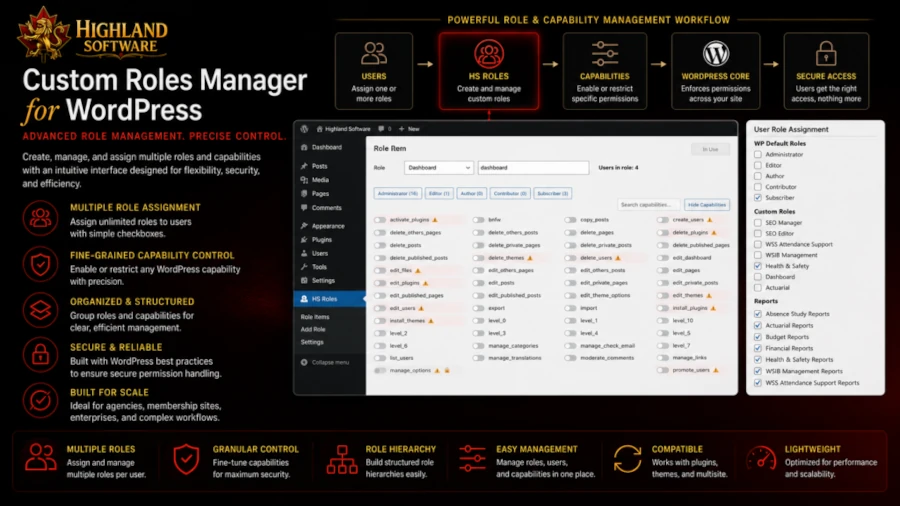
Project Overview
WordPress provides a limited default user role system that often lacks the flexibility required by businesses, membership platforms, agencies, and organizations managing complex user access requirements. Administrators frequently need granular control over permissions without relying on custom code or fragmented third-party solutions.
Highland Software Custom Role Manager was developed to provide a comprehensive role and permission management system that allows administrators to create custom roles, assign multiple roles to individual users, group permissions logically, and manage capabilities through an intuitive administrative interface.
The plugin extends WordPress core role architecture while preserving compatibility with native WordPress permission systems, allowing organizations to build scalable access control workflows that support custom business processes and advanced user management requirements.
Engineering Challenges Solved
Key technical challenges addressed during development requiring architectural planning, system compatibility design, backend engineering decisions, and long-term maintainable implementation strategies.
Supporting Multiple Role Assignment for Individual Users
Managing Capability Inheritance Without Breaking Core Permission Logic
Building Intuitive Administrative UI for Complex Permission Structures
Preserving Compatibility with Existing WordPress Roles API
Supporting Large-Scale User Management Workflows
Preventing Privilege Escalation Through Improper Capability Assignment
Maintaining Extensible Architecture for Future Role Management Features
Technology Stack
Core technologies and engineering systems used to architect, build, and deliver this project.
WordPress Plugin API
PHP Backend Architecture
WordPress Roles and Capabilities API
Custom Database Architecture
AJAX-Based Administrative Interactions
JavaScript Dynamic UI Management
WordPress User Management Integration
WCAG 2 AA Accessible Administrative Interface
Architecture & Engineering Decisions
Key architectural decisions designed to ensure scalability, maintainability, long-term compatibility, and stable software engineering practices throughout development.
The plugin architecture extends the native WordPress roles and capabilities framework while preserving compatibility with the underlying core permission system. A modular backend architecture manages custom role definitions, capability relationships, and multi-role user assignments without modifying core WordPress functionality.
Administrative interfaces were engineered using dynamic JavaScript interactions and AJAX-driven workflows to provide administrators with responsive role management tools capable of handling complex permission configurations and granular capability assignment without requiring page reloads.
The system was intentionally designed with extensibility in mind, allowing future feature expansion including role grouping, capability templates, workflow-based permissions, and enterprise-grade user access management systems while maintaining long-term maintainability.
Project Outcomes
Key deliverables and engineering outcomes successfully achieved through system architecture, technical implementation, and long-term maintainable development practices.
Delivered a scalable WordPress role management system extending native WordPress permission architecture safely.
Enabled administrators to create unlimited custom roles with fully granular capability management.
Implemented multiple role assignment for individual users improving organizational workflow flexibility.
Provided intuitive administrative interfaces simplifying complex permission management tasks.
Demonstrated advanced expertise in extending core WordPress architecture while preserving long-term plugin compatibility.
Project Resources
Explore public project resources, live releases, repositories, and supporting materials related to this software engineering project.
Need Advanced WordPress Plugin Development Expertise?
Highland Software engineers custom WordPress plugins, backend systems, permission architectures, API integrations, and scalable software solutions built for long-term maintainability, performance, and business growth.
Highland Software builds scalable software systems engineered for long-term maintainability, business growth, technical stability, and complex custom development requirements.
Let’s discuss your software architecture requirements and build scalable systems designed to solve real business challenges.